Category Archives: ECU Programming

This category includes ECU and TCU programming solutions such as bench, boot and OBD modes.

Covers engine and transmission control units, cloning, tuning and data reading/writing guides.

Suitable for professional technicians and chip tuning specialists.

2019 Newest KTM Bench ECU Programmer pour BOOT and Bench Read and write

KTM BENCH ECU Programmer for BOOT and Bench Read and write

KTM BENCH Features:
 Cover BMW N20, N55, N63, etc. to change or read/write ISN codes (done with other tools)Cover Bentley MED17.1.1 to read/write immo dataCover the latest Jaguar MED17.8.32Cover VW MED17.5.5, MED17.5.22, MED17.5.25…ALL can be done without ECU disassembling Good equipment of high quality and with the best technologyProfessional service and good efficiency

  1. NO LIMITS of the car model and year + NO NEED disassemble ECUs Read and write Bosch ECUs (Infineon’s chips) incl. flash and eeprom
  2. LESS RISK to clone/copy ECUs Able to modify data or do chip tuning to achieve superior performance
  3. MUCH CHEAPER, compared with the same functional tools The price is 1/10 of other programming tools in the market


Read and write an ECU in two ways: BOOT and Bench
R/W an ECU via BOOT: Infineon: TC1762/TC1766 MICRO (1504KB) (permanent)Infineon: TC1762/TC1766 EEPROM (32KB) (permanent)Infineon: TC1792/TC1796 MICRO (2048KB) (permanent)Infineon: TC1796 MICRO+EXT (4096KB/6144KB) (permanent)Infineon: TC1796 EXT (2048KB/4096KB) (permanent)Infineon: TC1796 EEPROM (128KB) (permanent)Infineon: TC1792 EEPROM (64KB) (permanent)Infineon: TC1738/TC1767 MICRO (2048KB) (permanent)Infineon: TC1738/TC1767 EEPROM (64KB) (permanent)Infineon: TC1797 MICRO (4096KB) (permanent)Infineon: TC1797 MICRO+EXT (6144KB/8192KB) (permanent)Infineon: TC1797 EXT (2048KB/4096KB) (permanent)Infineon: TC1797 EEPROM (64KB) (permanent)Infineon: TC1724/TC1728 MICRO (1536KB) (permanent)Infineon: TC1724/TC1728 EEPROM (64KB) (permanent)Infineon: TC1782/TC1784 MICRO (2560KB) (permanent)Infineon: TC1782/TC1784 EEPROM (128KB) (permanent)Infineon: TC1793/TC1798 MICRO (4096KB) (permanent)Infineon: TC1793/TC1798 MICRO+EXT (6144KB/8192KB) (permanent)Infineon: TC1793/TC1798 EXT (2048KB/4096KB) (permanent)Infineon: TC1793/TC1798 EEPROM (192KB) (permanent)Bosch: BMW/MB/VAG GPT (permanent)Bosch: Ford/Opel/Volvo GPT (permanent)Bosch: BMW TPROT8+ (permanent)Bosch: VAG TPROT8+ (permanent)Bosch: Kia/Hyundai/Honda TPROT8+ (permanent)Bosch: Chrysler/Jeep/Dodge/Fiat TPROT8+ [Test] (permanent)Bosch: VAZ/UAZ ME17.9.71 (permanent)Bosch: China ME17.8.8 (permanent)Continental: Kia/Hyundai/SsangYong SIM2K-24X/C201 (permanent)Continental: Ford EMS2204 (permanent)Continental: Ford EMS2207 (permanent)Continental: Ford EMS2211 (permanent)Continental: Ford SID208 (permanent)Continental: Ford SID209 (permanent)Continental: Ford Mondeo 4 SID807EVO (permanent)Continental: Ford Focus 3/Transit Connect SID807EVO (permanent)Continental: Citroen/Peugeot SID208 (permanent)Kia/Hyundai: Delphi MT86 EEPROM (16KB) (permanent)Mercedes-Benz: Delphi CRD3.1 EEPROM (32KB) (permanent) 

R/W an ECU on BENCH (without disassembling an ECU)

ECUs covered:

BOSCH_MED17.1.62_IROM_TC1793_EGPT_VAG
BOSCH_EDC17C60_IROM_TC1793_EGPT_PSA
BOSCH ME17.5.26 TC1724 VAG e-GPT
BOSCH_EDC17CP57_IROM_TC1793_EGPT_MERCEDES
BOSCH_EDC17C69_IROM_TC1793_EGPT_FCA
BOSCH_EDC17CP04_IROM_TC1796_EGPT_VAG
BOSCH_EDC17CP14_XROM_TC1796_EGPT_VAG
BOSCH_EDC17C19_IROM_TC1792_EGPT_OPEL
BOSCH_EDC17CP02_IROM_TC1766_EGPT_BMW
BOSCH_EDC17CP10_XROM_TC1796_EGPT_MEB
BOSCH_EDC17CP09_XROM_TC1796_EGPT_BMW
BOSCH_EDC17CP01_IROM_TC1796_EGPT_MEB
BOSCH_EDC17CP22_XROM_TC1796_EGPT_VOLVO
BOSCH_EDC17CP24_XROM_TC1796_EGPT_VAG
BOSCH_EDC17C08_IROM_TC1766_EGPT_KIA_HYUNDAI
BOSCH_EDC17CP20_XROM_TC1796_EGPT_VAG
BOSCH_EDC17CP07_IROM_TC1766_EGPT_TOYOTA
BOSCH_MEDV174_IROM_TC1766_EGPT_PSA
BOSCH_EDC17CP05_XROM_TC1796_EGPT_FORD
BOSCH_MEDV174_XROM_TC1796_EGPT_PSA
BOSCH_MEVD17.2_IROM_TC1797_EGPT_BMW
BOSCH_MED17.1_XROM_TC1796_EGPT_VAG
BOSCH_EDC17C10_IROM_TC1797_EGPT_PSA
BOSCH_EDC17CP45_IROM_TC1797_EGPT_BMW
BOSCH_EDC17CP10_XROM_TC1796_EGPT_MEB
BOSCH_EDC17CV52_IROM_TC1797_EGPT_DEUTZ
BOSCH_EDC17C18_IROM_TC1766_EGPT_OPEL
BOSCH_EDC17C10_IROM_TC1797_EGPT_FORD
BOSCH_MED17.1.1_IROM_TC1796_EGPT_VAG
BOSCH_EDC17C46_IROM_TC1767_EGPT_VAG
BOSCH_ME17.9.11_IROM_TC1762_EGPT_KIA_HYUNDAI
BOSCH_EDC17CP52_IROM_TC1797_EGPT_ALL_BRAND
BOSCH_EDC17C08_IROM_TC1766_EGPT_PIAGGIO
BOSCH_MED17.1.1_IROM_TC1797_EGPT_VAG
BOSCH_EDC17C42_IROM_TC1767_EGPT_NISSAN
BOSCH_EDC17CP22_XROM_TC1796_EGPT_VOLVO
BOSCH_EDC17CV54_IROM_TC1767_EGPT_ALLBRAND
KEFICO_MEG17.9.12_IROM_TC1762_EGPT_KIA
BOSCH_EDC17CV54_IROM_TC1767_EGPT_ALLBRAND
BOSCH_ME172_BMSX_IROM_TC1797_EGPT_BMW_MOTORRAD
BOSCH_EDC17C53_IROM_TC1767_EGPT_MAHINDRA
BOSCH_EDC17C55_IROM_TC1767_EGPT_MAHINDRAV
BOSCH_EDC17C49_IROM_TC1797_EGPT_ALL_BRAND
BOSCH_ME17.7.8_TC1797_EGPT_IROM_MEB
BOSCH_ME17.9.21_IROM_TC1724_EGPT_KTM
BOSCH_EDC17CP14_IROM_TC1796_EGPT_HYUNDAI_KIA
BOSCH_EDC17C53_IROM_TC1767_EGPT_MAHINDRA
BOSCH_EDC17CV54_IROM_TC1767_EGPT_ALLBRAND
BOSCH_MED17.0.1_IROM_TC1767_EGPT_FORD
BOSCH_E86_IROM_TC1797_EGPT_CHEVROLET_GMC
BOSCH_EDC17CV42_IROM_TC1797_EGPT
BOSCH_EDC17CV41_IROM_TC1797_EGPT_ALLBRAND
BOSCH ME17.3.0 TC1724 EGPT FAL
BOSCH_MED17.3.3_IROM_TC1793_EGPT_FAL
BOSCH_EDC17C53_IROM_TC1767_EGPT_SAME
BOSCH_MED17.1.61_IROM_TC1793_EGPT_VAG
BOSCH_EDC17CP14_XROM_TC1796_EGPT_VAG
BOSCH_EDC17C41_IROM_TC1797_EGPT_BMW
BOSCH_E86_XROM_TC1796_EGPT_CHEVROLET_GMC
BOSCH_EDC17C50_IROM_TC1797_EGPT_BMW
BOSCH_EDC17C56_IROM_TC1797_EGPT_BMW
BOSCH_EDC17CP49_IROM_TC1797_EGPT_BMW
BOSCH_ME17.9.74_IROM_TC1762_EGPT_POLARIS
BOSCH_EDC17C64_IROM_TC1797_EGPT_VAG
BOSCH_MEVD172G_IROM_TC1797_EGPT_BMW
BOSCH_MEVD1728_IROM_TC1797_EGPT_BMW
BOSCH_EDC17CP48_IROM_TC1797_EGPT_VOLVO
BOSCH_EDC17C57_IROM_TC1793_EGPT_KIA_HYUNDAI
BOSCH_MED17.8.31_IROM_TC1797_EGPT_JAGUAR_LR
BOSCH_EDC17C59_IROM_TC1767_EGPT_OPEL
BOSCH_MED17.5.2_IROM_TC1767_EGPT_VAG
BOSCH_MED17.5.21_IROM_TC1782_EGPT_VAG
BOSCH_MED17.5.5_IROM_TC1767_EGPT_VAG
BOSCH_ME17.5.24_IROM_TC1724_EGPT_VAG
BOSCH_ME17.2.4.2_BMSO_IROM_TC1793_EGPT_BMW_MOTORRAD
BOSCH_EDC17C74_IROM_TC1793_EGPT_VAG
BOSCH_ME17.8.3_IROM_TC1797_EGPT_MCLAREN
BOSCH_MED17.3.4_IROM_TC1797_EGPT_MASERATI
BOSCH_EDC17C66_IROM_TC1793_EGPT_MERCEDES
BOSCH_MED17.7.5_IROM_TC1793_EGPT_MERCEDES
BOSCH_MED17.5.5_IROM_TC1766_EGPT_VAG
BOSCH_EDC17CP14_XROM_TC1796_EGPT_VAG
BOSCH_EDC17CP47_IROM_TC1797_EGPT_OPEL
BOSCH_MEVD17.2.3_IROM_TC1793_EGPT_BMW_MINI
BOSCH_MED17.1_IROM_TC1796_EGPT_VAG
BOSCH_EDC17C84_IROM_TC1782_EGPT_NISSAN
BOSCH_MED17.5.25_IROM_TC1782_EGPT_VAG
BOSCH_MED17.8.31_IROM_TC1797_EGPT_ASTONMARTIN
BOSCH_MED17.4.4_IROM_TC1793_EGPT_PSA
BOSCH_EDC17CP68_IROM_TC1797_EGPT_VOLVO
BOSCH_ME17.9.21_IROM_TC1724_EGPT_DUCATI
BOSCH_EDC17C73_IROM_TC1793_EGPT_TOYOTA
BOSCH_ME17.5.6_IROM_TC1767_EGPT_VAG
BOSCH_ME17.1.1_IROM_TC1796_EGPT_VAG
BOSCH_MED17.1.11_IROM_TC1797_EGPT_PORSCHE
BOSCH_MED17.1.21_IROM_TC1793_EGPT_VAG
BOSCH_EDC17CP50_IROM_TC1797_EGPT_HONDA
BOSCH_MED17.9.3_IROM_TC1793_EGPT_HONDA
BOSCH_EDC17C79_IROM_TC1797_EGPT_FCA
BOSCH_MED17.3.5_IROM_TC1793_EGPT_FCA
BOSCH_MED17.9.7_IROM_TC1767_EGPT_JAGUAR_LRV
BOSCH_EDC17CV42_IROM_TC1797_EGPT_MAN
BOSCH_MEDC17.9_IROM_TC1793_EGPT_JAGUAR_LR
BOSCH_EDC17CP55_IROM_TC1793_EGPT_JAGUAR
BOSCH_EDC17CP62_IROM_TC1793_EGPT_KIA_HYUNDAI
BOSCH_EDC17C70_IROM_TC1793_EGPT_FORD
BOSCH_EDC17C53_IROM_TC1767_EGPT_KIA_HYUNDA
BOSCH_MED17.2_IROM_TC1767_EGPT_FORD
BOSCH_MED17.1.27_IROM_TC1793_EGPT_VAG
BOSCH_MED17.9.63_IROM_TC1793_EGPT_SUZUKI
BOSCH_EDC17C49_IROM_TC1797_EGPT_ALL_BRAND
BOSCH_EDC17C76_IROM_TC1793_EGPT_BMW
BOSCH_ME17.5.20_IROM_TC1767_EGPT_VAG
BOSCH_EDC17C54_IROM_TC1797_EGPT_VAG
BOSCH_EDC17C53_IROM_TC1767_EGPT_MAHINDRA
BOSCH_EDC17CP65_IROM_TC1793_EGPT_FORD
BOSCH_EDC17C69_IROM_TC1793_EGPT_FCA
BOSCH_ME17.9.64_IROM_TC1724_EGPT_SUZUKI
BOSCH_ME17.9.52_IROM_TC1782_EGPT_TOYOTA
BOSCH_ME17.9.71_IROM_TC1724_EGPT_PSA
BOSCH_ME17.9.23_IROM_TC1724_EGPT
BOSCH_ME17.7_XROM_TC1796_EGPT_MEB
BOSCH_MED17.1.10_IROM_TC1793_EGPT_VAG
BOSCH_ME17.9.71_IROM_TC1724_EGPT_PSA
BOSCH ME17.5.22 TC1724 VAG e-GPT
BOSCH_EDC17CP05_IROM_TC1797_EGPT_FORD
BOSCH_ME17.2.4_BMSMP_IROM_TC1793_EGPT_BMW_MOTORRAD
BOSCH_MED17.0.7_IROM_TC1782_EGPT_FORD
BOSCH_MEVD1784_IROM_TC1797_EGPT_BMW
BOSCH_EDC17C83_IROM_TC1793_EGPT_ISUZU
BOSCH_MED17.8.32_IROM_TC1793_EGPT_JAGUAR_LR
BOSCH_MED17.7.7_IROM_TC1793_EGPT_MEB
BOSCH_ME17.9.53_IROM_TC1782_EGPT_TOYOTA
BOSCH_ME17.8.33_IROM_TC1793_MCLAREN


2018 nouvelle arrivée Renault Renolink OBD2 Renault ECU Programmer

Renolink OBD2 Renault ECU Programmer

Renolink is a professional programming device for programming electronic control units
in Renault and Dacia vehicles, including new models recently produced.
Renolink has many features like UCH matching, airbag programming,
engine ECU programming, key coding, key deletion, dashboard coding,
eprom and flash reading and writing in Renault and Dacia vehicles.

The works you can do with Renolink programming device:

– Eprom read / write
– ECU Resetting
– Clear Crash Airbag
– Airbag reset
– Airbag Virginize
Keys
– KEY Programming
TDB (cluster)
– Indicator Programming
– ECM Programming
– UCH Programming

EPS Virginizer
– EPS Resetting

You can connect Renolink programmer device to vehicles via OBD socket,
and you can make programming easily and delete memory and introduce units
without disassembling ECU, EPROM and flash drives.
Thanks to the Renolink,you can easily virginize and re-program the parts like UCH, motor bracket,
indicator, airbag module, fuse table, which are installed new or used ones on the Renault and Dacia vehicles.

2018 New Arrival Renault Renolink OBD2 Renault ECU Programmer

Renolink is a professional programming device for programming electronic control units in Renault and Dacia vehicles,  including new models recently produced.
Renolink has many features like UCH matching, airbag programming, engine ECU programming, key coding, key deletion, dashboard coding, eprom and flash reading and writing in Renault and Dacia vehicles.
The works you can do with Renolink programming device:
– Eprom read / write
– ECU Resetting
– Clear Crash Airbag
– Airbag reset
– Airbag Virginize
Keys
– KEY Programming
TDB (cluster)
– Indicator Programming
– ECM Programming
– UCH Programming
EPS Virginizer
– EPS Resetting
You can connect Renolink programmer device to vehicles via OBD socket, and you can make programming easily and delete memory and introduce units without disassembling ECU, EPROM and flash drives. Thanks to the Renolink, you can easily virginize and re-program the parts like UCH, motor bracket, indicator, airbag module, fuse table, which are installed new or used ones on the Renault and Dacia vehicles.

Renault Renolink Fonctions:

la correspondance UCH
la programmation des airbags
la programmation du calculateur moteur
le codage des clés
la suppression des clés
le codage du tableau de bord
la lecture et l’écriture flash dans les véhicules Renault et Dacia

Les travaux que vous pouvez effectuer avec l’appareil de programmation Renolink:

– Lire/Ecrire Eprom
– Réinitialisation de l’ECU
– Effacer la collision d’Airbag
– Réinitialisation de l’airbag
– Airbag Virginize

Clé 
– Programmation de clé
– TDB (cluster)
– Programmation des indicateurs
– Programmation d’ECM

– Programmation d’UCH
– EPS Virginizer
– Réinitialisation EPS

Package includes:
1pc x Renolink OBD2 Renault ECU Programmer
Logiciel Affiche:
Logiciel Affiche
Logiciel Affiche
Logiciel Affiche 1.52
Logiciel Affiche renault renolink 1.52
renault renolink 1.52
renault renolink 1.52 Logiciel
renault renolink
renault-renolink-software
renault renolink 1.52 software
renault-renolink-software

KTM FLASH KTMflash ECU Programmeur Supporte V-A-G DQ200 DQ250 Infineon Bosch Pre-Order

KTM Flash ECU Programmer & transmission Powerful Upgrade Tool 
Read the chip data, change the computer, read transmission data etc, the speed is very fast.
 Highlights of KTMflash Programmer
1.Workable Transmission Model
2.Read Chinese car via OBD
3.Read BOOT mode according to the chip model
4.Read the encrypted ECU password (Read the password of encrypted ECU first, then read data)
Support Chinese car ME17 TC1728/1767 data reading & writing and password reading
Workable Transmission Model:
V-A-G: DQ200 (0AM)
V-A-G: DQ200MQB/G2 (0CW)
V-A-G: DQ250C (02E) K-Line
V-A-G: DQ250E/F (02E)
V-A-G: DQ250MQB (0D9)
V-A-G: VL300/V30 (01J/0AN) K-Line
V-A-G: VL300/V30 (01J/0AN)
V-A-G: VL381 (0AW)
V-A-G: DQ500 (0BH/0BT)
V-A-G: DL501/G2 (0B5)
V-A-G: DQ200/MQB Boot (MICRO)
V-A-G: DQ200/MQB Boot (EEPROM)
V-A-G: DQ200G2 Boot (MICRO)
V-A-G: DQ200G2 Boot (EEPROM)
V-A-G: DQ250E/F/MQB Boot (MICRO)
V-A-G: DQ250E/F/MQB Boot (EEPROM)
V-A-G: VL300/V30 BSL (FLASH)
V-A-G: VL300/V30 BSL (EEPROM)
V-A-G: VL381 Boot (MICRO)
V-A-G: VL381 Boot (EEPROM)
V-A-G: DL501 Boot (MICRO)
V-A-G: DL501 Boot (EEPROM)
V-A-G: DL501G2 Boot (MICRO)
V-A-G: DL501G2 Boot (EEPROM)
Read Chinese car via OBD:
China: Chery, Great Wall, Lifan, SAIC ME17 (ME17.8.8)
China: Chery, Great Wall, Lifan MT80 K-Line Calibration (Delphi MT80)
China: Chery, Great Wall, Lifan MT80 CAN-bus (Delphi MT80)
Read BOOT Mode According to the chip model:
Infineon: TC1762/TC1766 MICRO (1504KB)
Infineon: TC1762/TC1766 EEPROM (32KB)
Infineon: TC1792/TC1796 MICRO (2048KB)
Infineon: TC1796 MICRO+EXT (4096KB/6144KB)
Infineon: TC1796 EXT (2048KB/4096KB)
Infineon: TC1796 EEPROM (128KB)
Infineon: TC1792 EEPROM (64KB)
Infineon: TC1738/TC1767 MICRO (2048KB)
Infineon: TC1738/TC1767 EEPROM (64KB)
Infineon: TC1797 MICRO (4096KB)
Infineon: TC1797 MICRO+EXT (6144KB/8192KB)
Infineon: TC1797 EXT (2048KB/4096KB)
Infineon: TC1797 EEPROM (64KB)
Infineon: TC1724/TC1728 MICRO (1536KB)
Infineon: TC1724/TC1728 EEPROM (64KB)
Infineon: TC1782/TC1784 MICRO (2560KB)
Infineon: TC1782/TC1784 EEPROM (128KB)
Infineon: TC1793/TC1798 MICRO (4096KB)
Infineon: TC1793/TC1798 MICRO+EXT (6144KB/8192KB)
Infineon: TC1793/TC1798 EXT (2048KB/4096KB)
Infineon: TC1793/TC1798 EEPROM (192KB)
Read the encrypted ECU password (Read the password of encrypted ECU first, then read data):
Bosch: Support Chinese car ME17 TC1728/1767 data reading & writing and password reading
Bosch: BMW/MB/V-A-G GPT
Bosch: Ford/Opel/Volvo GPT
Bosch: BMW TPROT8+
Bosch: V-A-G TPROT8+
Bosch: Kia/Hyundai/Honda TPROT8+
Bosch: Chrysler/Jeep/Dodge/Fiat TPROT8+ [Test]
Bosch: VAZ/UAZ ME17.9.71
Continental: Kia/Hyundai/SsangYong SIM2K-24X/C201
Continental: Ford EMS2204
Continental: Ford EMS2207
Continental: Ford EMS2211
Continental: Ford SID208
Continental: Ford SID209
Continental: Ford Mondeo 4 SID807EVO
Continental: Ford Focus 3/Transit Connect SID807EVO
Continental: Citroen/Peugeot SID208
Kia/Hyundai: Delphi MT86 EEPROM (16KB)
Mercedes-Benz: Delphi CRD3.1 EEPROM (32KB)

How to use KTM FlASH ECU programmer Switch board? 
1. The switch board is designed to work with J2534, this device uses the Ktag cables so the user can refer to the Ktag wiring diagram.
2. Advise you use Open Port2.0 as the protocol conversion equipment and work with PC.
3. There are 3 types of Bosch Infineon ECU :
 1) The Infineon ECU before TPROT8.
 2) TPROT8-10
 3) The Infineon ECU after TPROT10 which is what we call GPT encrypted.
4. The Infineon ECU before TPROT8 is not encrypted, you directly uses the BOOT point
grounding, then follow the Ktag user manual to wire the cable and read the data.
5.For TPROT8-10,the Bosch Company set the anti-debugging mode, reading EEPROM needs no password and reading Flash needs password.
 Therefore, during the reading process, there is an extra CNF1, Boot outputs low level and CNF1 outputs high level. When reading, Boot needs to add one small resistor and ground it. CNF1 to connect one 470ohm-2K resistance, then connect 3.3V, it’s very important, otherwise the ECU will be burnout.
2 tips on reading the data:
 1) BOOT and CNF1 must be connected when reading data.
 2) Only connect BOOT not CNF1 When reading the password, otherwise the password can’t be read out. Also you can follow the Ktag wiring diagram because Ktag controls the CNF1 turn on and off, so it can’t be disconnected. When reading the password, you turn the two switches to the automatic mode, and to the On mode when reading the data, when the software prompts, you choose ” Manually” then follow the message to turn on or off.
6. For GPT encrypted ECU, the S1, S2 and Boot cable are needed to connected when reading password, and the S1, S2 don’t need to be connected when reading data

COMMENT METTRE A JOUR L’OUTIL DE PROGRAMMATION XPROG M XPRONG ECU POUR XPROG 5.74

COMMENT METTRE A JOUR L’OUTIL DE PROGRAMMATION XPROG M XPRONG ECU POUR XPROG 5.74

As we all known , Xprog M 5.74 is the latest the xprog programming tool.
Some customers ask whether they can update their xprog m 5.0 to xprog m 5.74.
Here we share detail steps about how to update xprog m ecu programming tool to xprog m 5.74 ecu remapping tool.

Eobdii.fr Xprog Update Notice:

You are at your risk.

For Newer Xprog M 5.74 ,pls connect

20180329174525

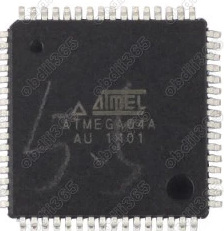
You also need: ATMEGA64 Repair Chip update XPROG-M

20180329175213

Free download XPROG Box V5.7.4 software:

https://mega.nz/#!PQUzGAKI!LuBfkREVI9vnjPtPKlhdjbv6welC8GkHoZM4Bm9wois

Free download XPROG M V5.7.4 setup exe:

https://mega.nz/#!vUknWAaZ!VwXXnaREXg4oRFRUYkvmPpkdEyj6ILX4hiEL3obYhMg

How to update XPROGM V5.0 software to XPROG M V5.74:

Unzip the XPROG 5.7.4.zip contents to a folder on your desktop.

Open the folder AVRDUDESS and run avrdudess.exe program.

The following procedure will flash the version 5.0 firmware on your XPROG device.

Select your programmer.

Click on “Detect” at the top right corner. It will detect ATMEGA64.

Select your flash file which is in the Firmware folder.

Select your EEPROM file which is in the Firmware folder.

Enable the “Erase flash and EEPROM (-e)” option.

Set the following in the “Fuses & lock bits”

L: 0x2F

H: 0xCA

E: 0xFF

LB: 0x3C

And enable the “Set fuses” and “Set lock” options.

Finally click on “Program” and wait till it finishes and verify all the data are flashed correctly.

If not then try again.

Now that the Xprog has version 5.0 firmware, go to the “XprogDesktop” folder and run “XprogDesktop.exe” file.

Click on “Help->Hardware info…” and once it opens it will ask to upgrade the firmware.

If not, then click on the “Upgrade” button. Once this procedure is finished you can try and read a processor. It will ask for a certificate. If it fails try again.

When it is finished the XPROG will run the latest firmware and you will be able to work with the latest Xprog 5.74 software!

Again note that this is not a 100% successful guide, some work and some may not.

20180329174509

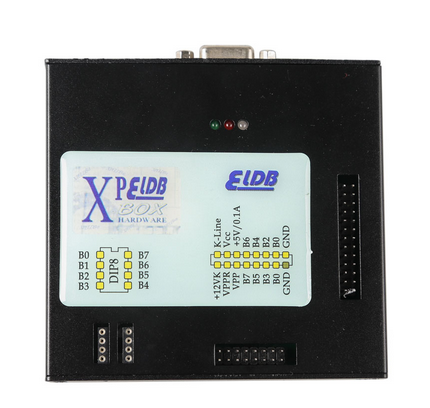
2018 Nouveau Xprog-M XPROG-Box ECU Programmer V5.84 with USB Dongle and AUTH-0028-1

(Hot)  2018 Latest XPROG-M V5.84 with USB Dongle 
Top Reasons to Get 2018 Xprog-M V5.84
1. Software version: 5.84, Firmware version: 4.4
2. With USB Dongle, NO need activation
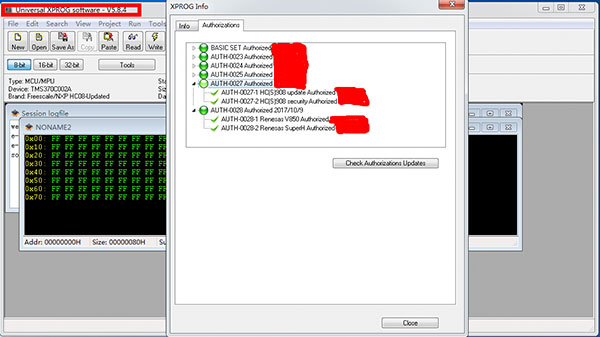
3. Add new authorization: AUTH-0028-1 Renesas V850 Authorized and AUTH-0028-2 Renesas SuperH Authorized 2017/10/9
4.  Language: English
XPROG-M V5.84 Tips:
1. DO NOT use this newest dongle to update the older version Xprog to V5.84
2. Close anti-virus software on your computer; otherwise, X-prog software would be killed.
3. Disconnect the internet; otherwise, the hardware would be damaged.
4. Uninstall the old version of xprog before you install V5.84 software we provide, because our xprog-box hardware is not compatible with newer or older software; otherwise, the hardware will be damaged and will lose its warranty…
5. Never try to UPDATE for the hardware will be damaged if you want to try to update it online, then you will lose its warranty.
XPROG-M V5.84 Authorizations:
AUTH-0001 Motorola HC05 family authorization (allows to read/write EEPROM)
AUTH-0002 Motorola HC08 family authorization (allows to read/write EEPROM)
AUTH-0003 Motorola HC11 family authorization (allows to read/write EEPROM)
AUTH-0004 Motorola HC12, 9S12 family authorization (allows to read/write EEPROM and flash memory)
AUTH-0005 Texas Instruments TMS370/TMS374 family authorization (allows to read/write EEPROM)
AUTH-0006 Motorola HC05Bxx and HC05Xxx family bypass security authorization (allows to read/write secured EEPROM and flash memory)
AUTH-0007 ST M35080 authorization. Read/Write/Erase device to delivery state.
AUTH-0008 BMW EWS3 authorization
AUTH-0009 ATMEGA family authorization (allows to read/write EEPROM and flash memory)
AUTH-0010 MB ZGS001 authorization
AUTH-0011 Motorola HC11EA9/E9 bypass security authorization (allows to bypass security bit and read EEPROM and RAM memory)
AUTH-0012 National CR16 authorization (allows to read/write EEPROM memory)
AUTH-0014 ST7, ST10 family authorization (allows to read/write internal flash)
AUTH-0015 MPC5xx authorization (depending on device program automatically detects MPC5xx, M95xxx device type, flash, external flash and configuration memory size)
AUTH-0018 Motorola HC12, HC912, MC9S12, MC9S12X bypass security authorization (allows to read/write secured EEPROM and flash memory)
AUTH-0020 ARM (Micronas, …) Family authorization (allows to read/write internal flash and external serial EEPROM)
AUTH-0021 ARM (Micronas, …) Family bypass security authorization (allows to read/write secured and non-secured internal flash and external serial EEPROM, view/change mileage, Chassis number (VIN), serial number and PIN code).
AUTH-0023-1 MAC7xxx
AUTH-0023-2 XC23xx
AUTH-0024-1 MC9S12Cxx
AUTH-0024-2 MC9S12XE
AUTH-0024-3 9S12XE SECURITY
AUTH-0024-4 MC9S12HA/HY/P
AUTH-0025-1 MPC/SPC5xxx Authorized 2016/3/13
AUTH-0027-1 HC(S)908 update Authorized 2016/3/13
AUTH-0027-2 HC(S)908 sercurity Authorized 2016/3/13
AUTH-0028-1 Renesas V850 Authorized 2017/10/9
AUTH-0028-2 Renesas SuperH Authorized 2017/10/9
XPROG-M V5.84 Adapters:
ADP-0001 TMS370 PLCC28 programming adapter
ADP-0002 TMS370 PLCC44 programming adapter
ADP-0003 TMS370 PLCC68 programming adapter
ADP-0004 Motorola HC05B/X PLCC52 programming adapter
ADP-0005 Motorola HC05B/X QFP64 programming adapter
ADP-0006 ST M35080 in-circuit programming adapter
ADP-0008 TMS374 family in-circuit programming adapter
ADP-0009 MC68HC05V12 programming adapter
ADP-0010 TMS374 on-board programming adapter
ADP-0011 HC11EA9/E9 programming adapter
ADP-0017 HC(S)12 BDM / ARM Micronas in-circuit programming/bypass security adapter
Additional adaptor for 5M48H P-Flash
ADP-0019 Rev.A
EWS3 adaptor
EEPROM adaptor
QFP28 adaptor
QFP64 adaptor
QFP80 adaptor
QFP112 adaptor
QFP144 adaptor
Installation Notice:
Windows System Requirement as Below
1. Windows system should be windows XP 32bit OR windows 7 64 bit, all the patch software for the windows system should be installed already and the windows properly works well…
2. The windows system should be with at lest 2 partitions (except the CD ROM.)
3. Can not be working with virtual harddisk.
Install manuals in words:
1. Click the file “installation.reg”, get the file information to the regedit.
2. Install the file “AdbeRdr11000_zh_CN.exe”, it is a must, otherwise the Xprog software will not start.
3. Plug the Xprog main interface to the computer, install the USB driver.
4. Copy the folder “XPROG-BOX5.84” to the desktop, and open it, and run the “xprogdesktop.exe”, then software open.
Software Display:
xprog m ecu box software display 1
xprog-m ecu box software display 2
xprog-m ecu box software display 3
Package Includes:
1pc x  XPROG-Box Hardware (Aluminum Enclosure) .
20pcx  Adapters Set
1pc x  USB Cable.
1pc x USB Dongle
1pc x  CD with XPROG-Box Software (V5.84)

[Livraison gratuite] Ktag V7.020 EU Version Red PCB K-tag Firmware V7.020 Online Version ECU Programmer No Tokens Need with GPT Cable

Ktag V7.020 EU Version Red PCB K-tag Firmware V7.020 Online Version ECU Programmer No Tokens Need with GPT Cable
KTAG 7.020 Master is the new generation KTAG Master Kit for all the ECU that need to be programmed with Jtag, BDM and Boot protocols(tricore and ST10) and you can use 2017 Newest LED BDM Frame With 4 Probe Pens Full Set together to simple your disassemble job.
K-TAG KTAG 7.020 Master Instructions:
Model name : KTAG Master
Software Version: V2.23 (Newest)
Fireware Version: V7.020
Update:By link
Car Models:For CAR,TRUCK,MOTORCYCLE,TRACTORS,boats,heavy duty,no year limited
Languages:English/ German/ Spanish/ Italian/ Portuguese/ French
Functions:Ecu Programming Tool
Connection:By BDM
Support Protocol:Jtag, BDM and Boot protocols(tricore and ST10)
1.)What’s main different between Our K-TAG KTAG 7.020 and others?
1.Mainly Different :  Our K-TAG 7.020 add a GPT cable to support GPT Functions ( GPT is new password algo cryptography that is implemented in new Tricore microcontrollers. our KTAG v7.020 can easily read and decrypt the secret password and it automatically unlocks/unprotects the Tricore sectors so it can read and write both Flash and Eeprom )
2.No reset button ,no USB Dongle. NO Tokens Limited!!!
3.REAL VERSION OF KTAG 7020 EURO ALL ACTIVATED VERSION!!!
2.)What is the advantage of KTAG V7.020 over than other EUC Chip Tuning Tools in the market?
1.Supports online full protocols ,fully activated,without tokens limited.
2.There are lot ECU that need to disassemble from the car and open and this is the case for all the ECU that need to be programmed with Jtag, BDM and Boot protocols, so KTAG is needed,as the new generation ktag master,ktag 7.020 is the best choice.
3.K-TAG 7.020 can work For Toyota Hilux kun26 and new added 100+ ECU types & supports new car models e.g. Toyota 76FXXX, PSA 17.4.4, Ford E83, VW 17.5.5 (1766), Mercedes-Benz 276 ECU, Toyota 76F, etc.
4.KTAG V7.020 add a cable with GPT Functions.
5.Online operation supported.
6.Best PCB With Murata filters.
7. Multi-Languages Supported .
8. With a great performance and tested by many tuners and was regarded as one of the best ECU Programmer for trucks ,heavy duty,boat.
9.No tokens limited, no years limited.
10.No USB Dongle,No reset button.
3.)KTAG v7.020 Red PCB ECU Tuning Tool Install/User Note
1 The KTAG you received will with latest software 2.23 and hardware 7.020 ,so Never update it online.We will send you free update link in future.
2 We don’t sell SD card and chips alone,sorry.
3 We offer free Transdata dimsport software for Ktag 6070,but no install help in this free gift.
4 Our KTAG 7.020 can be used online,no reset button need.No tokens limited
KTAG 7.020 Master is the new generation KTAG Master Kit for all the ECU that need to be programmed with Jtag, BDM and Boot protocols(tricore and ST10) and you can use 2017 Newest LED BDM Frame With 4 Probe Pens Full Set together to simple your disassemble job.
KTAG 7.020 Red PCB OBD2 Manager Tuning Kit PCB Display
K-TAG red PCB EU Version PCB Component!
1.       use of imported Japanese Murata NFE61PT472C1H9L filters
2.       2.8x WFs = Infineon, BCR112 NPN Digital Transistor
3.       3.7x 27E = ON Semiconductor NUP2105LT1G
4.       4.8x 6DW = NXP BC817215 NPN Bipolar Transistor
5.       5.3x A6c = MMUN2113LT1G / MMUN2113LT3G check your ktag PCB may already have 3 x A6c
6.       6.2x K5B = BC807-25-7-F PNP Bipolar Transistor

ktag 7020 red pcb 1
ktag red pcb display 2
ktag red pcb display 3


MPPS V21 V18 BOOTread/write ECUs

mpps-v18-ecu-tricore-boot-programmer-1-620x264

MPPS cables with v18 or v21 software read/write ECUs through the BOOT mode

MPPS V18 china clone read/write ECUs via BOOT:

Golf 1.6 TDI Siemens Simos Pcr2.1

R/W can (unlock boot mode-ok) – ok

Golf TDI EDC17c14

Boot mode.
read / write all ok,

ECU EDC17 on Audi a6 2009

this tool read via boot

Polo SIMOS 3PE 1.2 12v

read/write as generic simens SIM4LE boot mode flash 512kB – OK (catalyst off).

eeprom available

full boot

read normally, Not so OBD, just flash

China clone: EDC17C10 PSA

boot mode

Read OK 3:30min – faster than Ktag, Kess and FGtech.

Corsa D 1.3 CDTI, EDC17C18, 70.0kw,2010, Z13DTE

R/W bootmode TriCore™ = OK

Fiat Doblo 1.3 mjet mjd6f3 obd – r/w ok
Range Rover edc17cp11 boot – r/w ok
this tool looks great

MPPS V21 clone read/write ECUs via BOOT:
Read written FLESH + MPC + EEPROM fiat marely 6f3, OK through OBD.
There are few tools that read-write EEPROM marely by OBD.
OBD-flash reading 3min 20 sec., 45 sec-writing.
MPC and EEPROM read OBD-20 seconds, 20 seconds writing (multyboot OBD) .A very strong and stable tool.

its always a risk with edc17 , this ecu opens easy , boot is safer , if you trust your tool you have to make a choice

Ems3132 Bootmode. Read ok. Write not ok.

Jetta 2,0 16v TSi 200cv – MED17.5.2 Tprot10
Read in Boot = OK
made OBD unlock and CKS by MPPS, write boot = OK

Magneti Marelli 6f3, 6JF, 8F2, 8F3 in obd and multiboot with micro and eeprom works very well!

(thanks to all contributors)

VXDIAG VCX NANO FordECU Programming: 100% Success

This is Ford IDS Online Programming Service, incl. how to register an programming account , what kind of Ford diagnostic tool should use and how to use it for Ford ECU programming online. Hope this write-up helps.

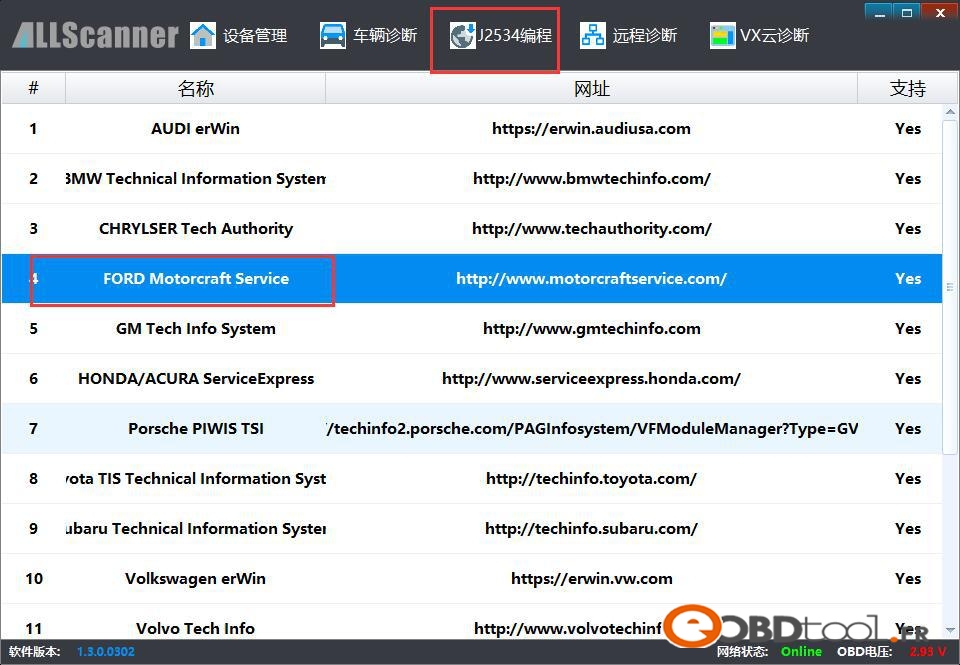
I am using VXDIAG VCX NANO Ford, AllScanner

Go to J2534 Programming

Http://www.motorcraftservice.com/ FORD Motorcraft Service

The official site to register my account

ford-pcm-programming-account-register

Online programming account only

Have good success on 2005 Ford Escape 3.0 V6

PCM programming online zero issues!!!

P.S, tips i followed:

How to do FORD PCM PROGRAMMING:

scope & scan scopes PCM Ford PCM vehicle diagnostics repair shop training technician training automotive aftermarket

Programming Ford electronic control units (ECUs) is pretty straightforward and simple compared to many other OEMs. However, Ford does do one thing differently than most other OEMs. The normal Ford programming procedure has you “inhale” (read and store) the As Built data from the old ECU to the scan tool so that these As Built vehicle specific production and calibration details can then be transferred to a new, remanufactured or salvaged ECU you are installing.

A complication arises when you are attempting to replace an ECU that is dead or not communicating with the scan tool or programming device. In this instance, you are going to have to use a different method of telling the replacement ECU what the needed As Built data information should be. The Ford recommended procedure for this is stated as:

“Programmable Module Installation (PMI) must be performed when replacing module. If the information cannot be inhaled from the original module, As-built data must be used to properly configure module”

This procedure requires purchasing a per use subscription for all ECUs, except the PCM, from the Ford Motorcraft website, http://www.motorcraftservice.com. Once purchased you use the vehicle identification number (VIN) to acquire the As Built data for the particular ECU you are replacing. This As Built data is actually multiple lines of hexadecimal numbers entered into dialogue boxes in the programming software. We will describe this process for Ford ECUs in next month’s column. For this months column we will describe a quicker method than acquiring the As Built hex info to install a replacement powertrain control module (PCM) in a Ford vehicle where the old PCM is damaged and not communicating. All we need do is tell a little white lie to the scan tool or programming device!

To accomplish this trick, connect your Ford diagnostic toolor Flash programming device to the diagnostic link connector (DLC). Leave the ignition key in the OFF position. While the key is off, attempt to connect with the vehicle using your tool’s software. The programming software will show a status bar for 45 seconds while it attempts communication with the vehicle. Of course, the communication attempt will fail because the key is off! It will then ask you to turn the key off and on again as it again attempts to communicate with the vehicle. After this process completes the software will ask you if you want to make another attempt. Choose no to this query.

You are then asked to choose from a list of vehicles to communicate with. Typically, your choice on this page will be “all other” shown on the top of the list as the rest of the list are non-domestic vehicle models

ford-pcm-programming-service-vxdiag-vcx-nano-1

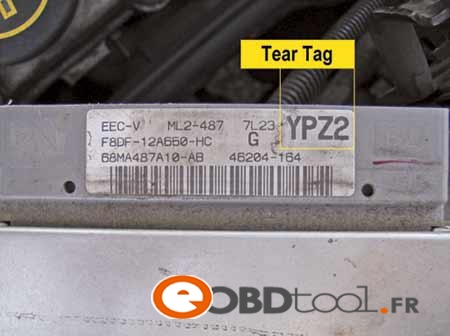
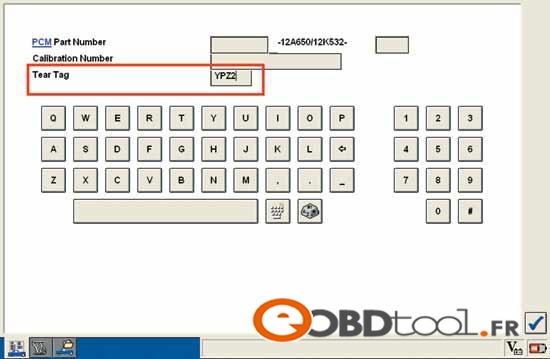
The software will explain that you must provide some numbers from the actual ID label on the old PCM in order for the software to identify the vehicle you intend to communicate with. Use the actual PCM’s label shown here if Figure 1 to gain the information you need. As you can see in screen shot shown in Figure 2, there are three sets of data fields you can use. You need only use one of these data fields to get the job done. I use the Tear Tag number because it is the easiest. In our example, we take the YPZ2 shown on the PCM label in figure 1 and type it into the Tear Tag data field as shown in Figure 2.

ford-pcm-programming-service-vxdiag-vcx-nano-2

The next screen shown will ask you to enter the VIN and mileage. This VIN information is important if your state has an OBDII inspection program requiring a VIN read from the DLC for positive vehicle identification purposes so do not skip this step.

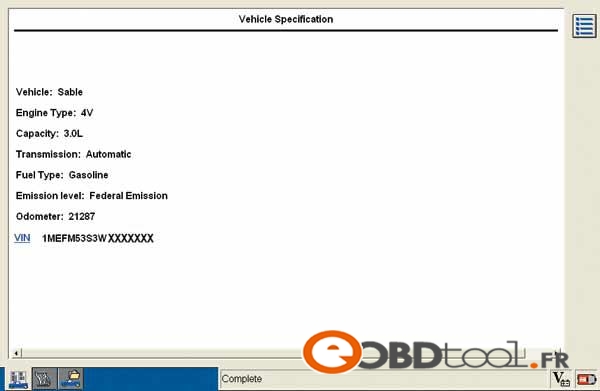
Once the vehicle is properly identified as shown in Figure 3, you can use the normal PCM replace and program procedure. You may be asked to provide a couple of other pieces of information like tire size or whether the vehicle has four-wheel drive or not.

ford-pcm-programming-service-vxdiag-vcx-nano-3