Category Archives: ECU Programming

This category includes ECU and TCU programming solutions such as bench, boot and OBD modes.

Covers engine and transmission control units, cloning, tuning and data reading/writing guides.

Suitable for professional technicians and chip tuning specialists.

Xprog M V5.60 New Released ECU Chip Tuning Tool

Hot Sale 2016 Latest Version X-PROG Box ECU Programmer XPROG-M V5.60  on eobdii.fr

Features of Xprog-M V5.60

1. Language: English
2. Newest Version V5.60
3. Operating system: Windows XP 32-bit or Windows 7 64-bit

Kindly Note
1. If your X-Prog is older version,cannot use this newest dongle to update to V5.60
2. Close all of the computer anti-software. If not, X-prog software may be killed.
3. Disconnect the internet. If not, the internet may damage the hardware.
4. Uninstall all the old xprog-m, or xprog box software, make sure that your PC only install our software for our xprog-box 5.60 ,
our xprog-box hardware cannot work with other lower or higher software. If not, the hardware will be damaged, and will lose its warranty…
5. Never try to UPDATE, the hardware will be damaged if you want to try to upgrade it online, without any warranty.
6. We cannot refund, cannot exchange, can not repair if you do not listen to those advices. It means that you accept those
conditions if you have ordered our xprog-box.

XPROG-M V5.60 Authorizations:
AUTH-0001 Motorola HC05 family authorization (allows to read/write EEPROM)
AUTH-0002 Motorola HC08 family authorization (allows to read/write EEPROM)
AUTH-0003 Motorola HC11 family authorization (allows to read/write EEPROM)
AUTH-0004 Motorola HC12, 9S12 family authorization (allows to read/write EEPROM and flash memory)
AUTH-0005 Texas Instruments TMS370/TMS374 family authorization (allows to read/write EEPROM)
AUTH-0006 Motorola HC05Bxx and HC05Xxx family bypass security authorization (allows to read/write secured EEPROM and flash memory)
AUTH-0007 ST M35080 authorization. Read/Write/Erase device to delivery state.
AUTH-0008 BMW EWS3 authorization
AUTH-0009 ATMEGA family authorization (allows to read/write EEPROM and flash memory)
AUTH-0010 MB ZGS001 authorization
AUTH-0011 Motorola HC11EA9/E9 bypass security authorization (allows to bypass security bit and read EEPROM and RAM memory)
AUTH-0012 National CR16 authorization (allows to read/write EEPROM memory)
AUTH-0014 ST7, ST10 family authorization (allows to read/write internal flash)
AUTH-0015 MPC5xx authorization (depending on device program automatically detects MPC5xx, M95xxx device type, flash, external flash and configuration memory size)
AUTH-0018 Motorola HC12, HC912, MC9S12, MC9S12X bypass security authorization (allows to read/write secured EEPROM and flash memory)
AUTH-0020 ARM (Micronas, …) Family authorization (allows to read/write internal flash and external serial EEPROM)
AUTH-0021 ARM (Micronas, …) Family bypass security authorization (allows to read/write secured and non-secured internal flash and external serial EEPROM, view/change mileage,chassis number (VIN), serial number and PIN code).
AUTH-0023-1 MAC7xxx(New added)
AUTH-0023-2 XC23xx(New added)
AUTH-0024-1 MC9S12Cxx(New added)
AUTH-0024-2 MC9S12XE(New added)
AUTH-0024-3 9S12XE SECURITY
AUTH-0024-4 MC9S12HA/HY/P
AUTH-0025-1 MPC/SPC5xxx (newly added)

Hardware information shown as below:
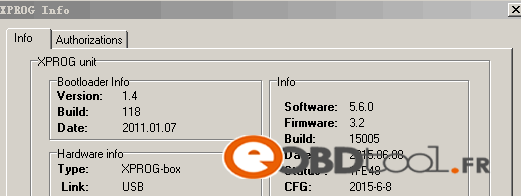
xprog-m-v5.6-hardware

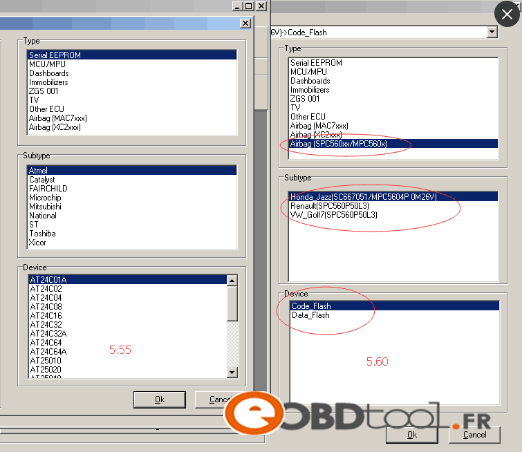
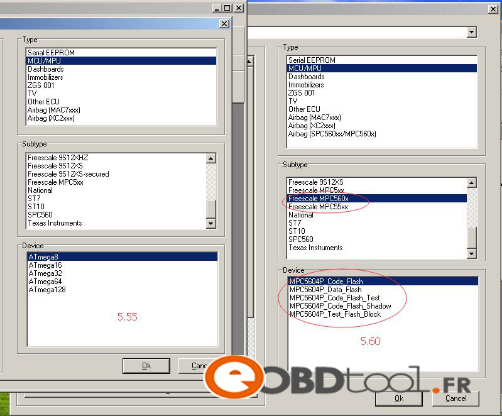
Compared with Xprog 5.55, 5.60 have additional function as follow photos shows:
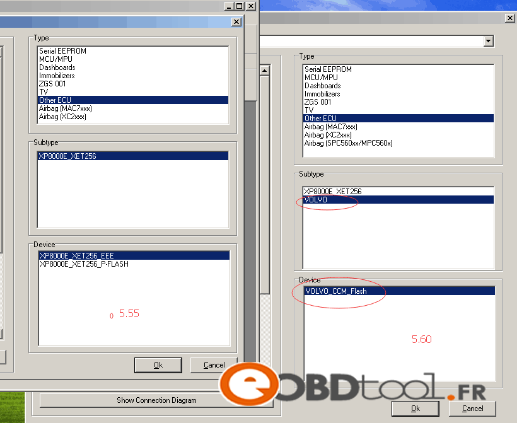
xprog-m-v5.6-vs-xprog-m-v5.5-1 xprog-m-v5.6-vs-xprog-m-v5.5-2 xprog-m-v5.6-vs-xprog-m-v5.5]

CARPROG complète ECU Chip Tuning Feedback

1.

CARPROG fonctionne à la fois avec la solution, odb et soudure à lire l’EPROM.
certains accident d’airbag peut être réparé par obd mais en général, nous devons et passé par la case dessouder des EPROM. l’avantage, il dispose d’une base de données d’accident clair pour certains modèles, un générateur de code radio d’origine; c’est un bon programme pour commencer.

CARPROG complète v7.28 avec tout et expliqué dans le logiciel, et il est livré avec plusieurs

numéro de connectivité. En sélectionnant une fonction que nous voulons l’utiliser nous dit ce que les connecteurs utilisés.

Il est même illustré avec des photos très agréable.

2.

Pour moi, il est pas mal pour commencer, l’équipement de base (station à air chaud, stylo flux, fer à souder avec une pointe fine) ismandatory à exploiter

3.

Les débutants optent pour CARPROG.It offre beaucoup de possibilités, il ne couvre pas tous, mais une bonne partie. Manipulation simple, application intuitive. il est dash polivalent, immo, radio ..

4.

Je l’habitude de virginiser de BSI, je aussi réussi à modifier un véhicule 2002 en tiret (juste pour tester, Idelivered comme avant)

J’ai aussi réussi à lire DE 5p08 (95p08) et écrire hors des propriétés pas mal pour les débutants, moins efficaces que XPROG ou UPA, mais plus facile à utiliser.

bon flash

5.

Question: Vous avez un marchand recommander? une version chinoise est-ce le cas?

Ils sont bien et ont une relation à la clientèle très bonne

Question: Vous voulez dire que le clone ou l’original? Parce que le budget est pas le même … Et le niveau de fonctionnalité de clone, on peut estimer le nombre de pour cent par rapport à l’original (si quantifiable)? Gadget ou bon outil pour commencer?

Réponse: Il est de 40% de l’original sur les codes de radio ok, mais le tableau de bord il n’y a pas un manque d’image que le reste est un CARPROG très fragile utiliser après plusieurs niaiserie plus de communication avec l’interface, il doit être utilisé avec un PC sans Internet avec un ca va stable et xp …

Super bons outils ont commencé franchement je suis très heureux facile à utiliser mais il est toujours le brol de lolll comme un outil qui rend

plusieurs opérations:

-airbag

la radio -code

-Immo

-compteur

-ecu opel

-certains EPROM

-certains MCU

(Un outil qui vous aide à un jour est inestimable …)

Genius and Flash Point ECU Chip Tuning Tool TF Card Reset Procedure

Genius and Flash Point ECU Chip Tuning Tool TF Card Reset Procedure

Sometimes, you may find that the file side the Genius and Flash Point ECU Chip Tuning Tool TF Card ruined. Then you will need to fix the file of the TF card. This video is to fix the TF card file for the Genius & Flash K-touch ECU Tool.

Tips1: You only can use the TF card from a complete set of the Genius. Do not use the TF card bought from the local market.
Tips2: Before fixing, you need to format the TF card.
Tips3: The k-touch.img fixing file must be in disk D or disk E. Do not put the k-touch.img in the file of the disk D or disk E.

How to get security code when programming key with XTOOL X-100 PAD?

How to get security code when programming key with XTOOL X-100 PAD?

X-100 PAD is a tablet with the latest technologies to perform key programming, mileage adjustment, oil service light reset, timing belt service light reset, tire pressure warning light reset , EPB reset, throttle body reset, DPF reset, battery reset, steering angle calibration and OBD-II engine diagnosis.

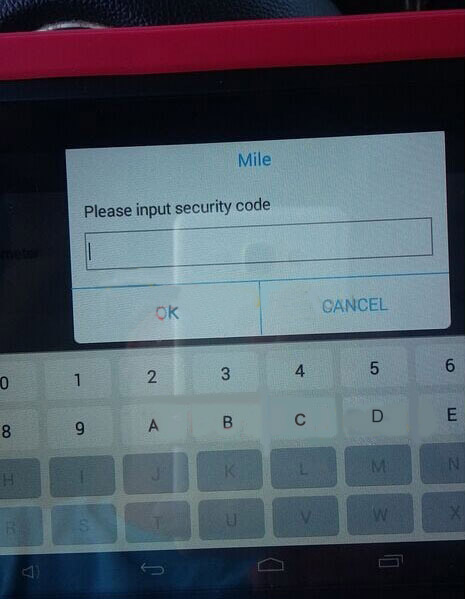
One of our customer use this to program key for 2008 Chevy Express Cargo Van. XTOOL X-100 PAD Tablet Key Programmer asks for security code. Where to get the security code?

Look at this photo. When you make this key, enter this page. You will read the code. Send this code, your detailed car list, year to sales@eobdii.fr. We will send these information to XTOOL company to calculate the code and resend it to you.

Attention: Only GM series vehicles will need this.

xtool-x-100-x100-pad-tablet-key-programmer-technical

More about the XTOOL X-100 PAD: http://www.eobdii.fr/wholesale/xtool-x-100-pad-tablet-key-programmer.html.

AUTEL MaxiSys Elite with J2534 ECU Preprogramming Box VCI Firmware Update

AUTEL MaxiSys Elite with J2534 ECU Preprogramming Box VCI Firmware Update

The Update section is applied for updating the VCI firmware via the Internet through the MaxiSys tablet connection. Before updating the VCI firmware, please make sure the MaxiSys tablet network connection is stable.

To update the VCI device software

1. Power on the MaxiSys display tablet.
2. Connect the VCI device to MaxiSys tablet via USB.
3. Tap the VCI Manager application on the MaxiSys Job Menu of the
display tablet.
4. Select Update from the connection mode list.
5. The current version number and the latest version number of the VCI software will be displayed after a few seconds, click Update. Now to update the VCI software if available.

SVDI PSA ABRITES Commander V5.8 For Peugeot and Citroen Special Function: Read Security Code

SVDI PSA ABRITES Commander V5.8 For Peugeot and Citroen Special Function: Read Security Code

SVDI PSA ABRITES Commander For Peugeot and Citroen is new arrival dealer level tool for Peugeot and Citroen. You can use the SVDI PSA ABRITES Commander to take place of the FVDI PSA. Now, we show you the security code reading function.

The appropriate special function is opened by selecting it from the list box and double-clicking on it, or by selecting it and then pressing the “Open” button.

Security Code (PIN) is 4 symbols code that is requested for Key learning and vehicle configuration modifications. In order to start this special function, click on “Read Security Code” icon in special functions section.
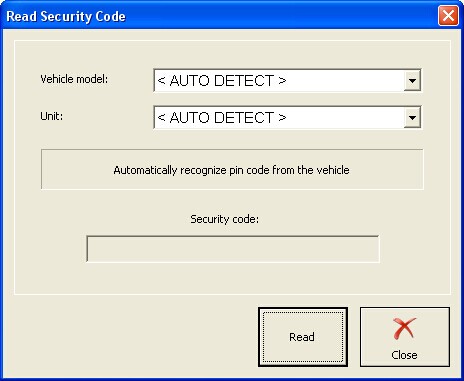
After Read Security Code dialog is opened, select the vehicle and the unit. If you’re not sure which is the car model or there are errors retrieving the PIN – set it to “< AUTO DETECT >”. If you’re not sure about the unit or there are errors while retrieving the PIN leave it to “< AUTO DETECT >”.

svdi-psa-abrites-commander-security-code-1
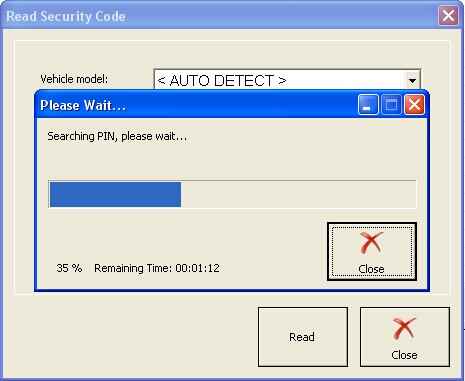
Click on the Read button and wait until the operation finish.

svdi-psa-abrites-commander-security-code-2

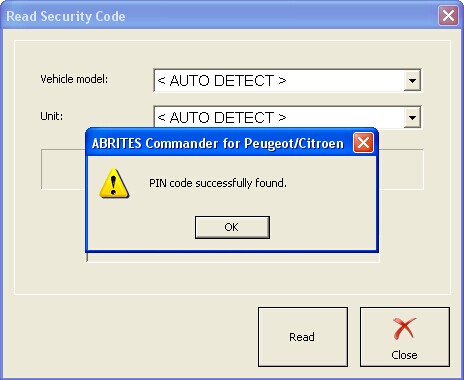
Note that PIN search always starts with checking the PIN reading capabilities that may take up to 15 minutes. Some BSIs require some additional specific operations to be performed – this is “Working on BSI” phase – up to 5 minutes. At the end the following message should appear:

svdi-psa-abrites-commander-security-code-3

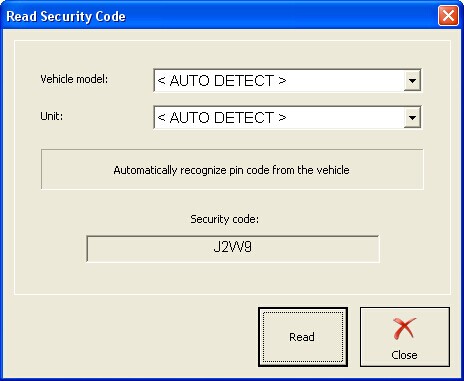
Click OK to see the PIN code in the field Security Code:

svdi-psa-abrites-commander-security-code-4

KTAG K-TAG ECU Programming Tool Technique Support FAQ

KTAG K-TAG ECU Programming Tool Technique Support FAQ

Q1: Can I use KTAG on Windows XP?
A1: KTAG is compatible with both Windows XP and WIN7, but not all WIN7 is workable, better use WIN7 professional.

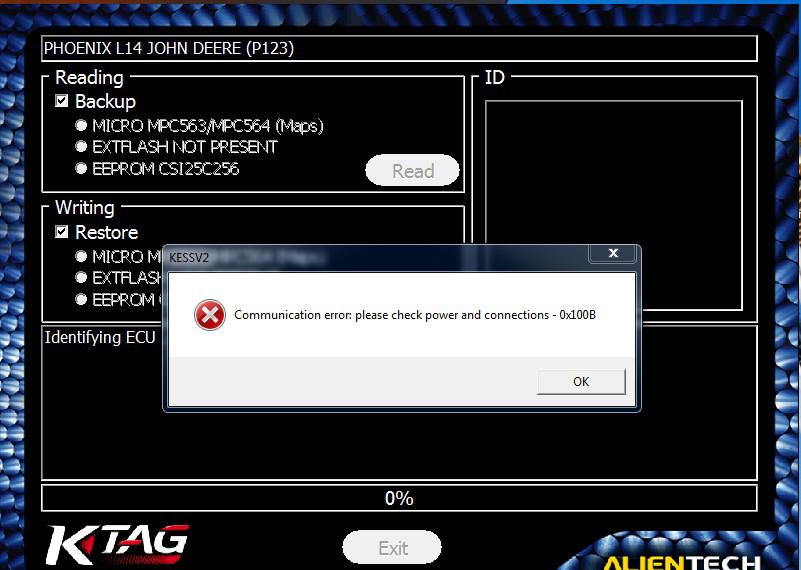
Q2: Ktag “Communication error: please check power and connections – ox1008.”

ktag-communication-error-01
A2: Please check whether the car ECU is connected with the power.

Q3: Does KTAG ECU programmer have limit number of times, only 32 and then throw it away?
A3: No, it has no limit you can always use it. But if you keep on giving ECU to write map file, then it has about 500 times limit. If your KTAG has limit counter and the KTAG board is no gluing, please contact us we will send you chip for replacement, but there are two conditions to change chip:
1) it is our KTAG not from other sellers;
2) you are required to know how to change the chip otherwise the KTAG will be damaged.

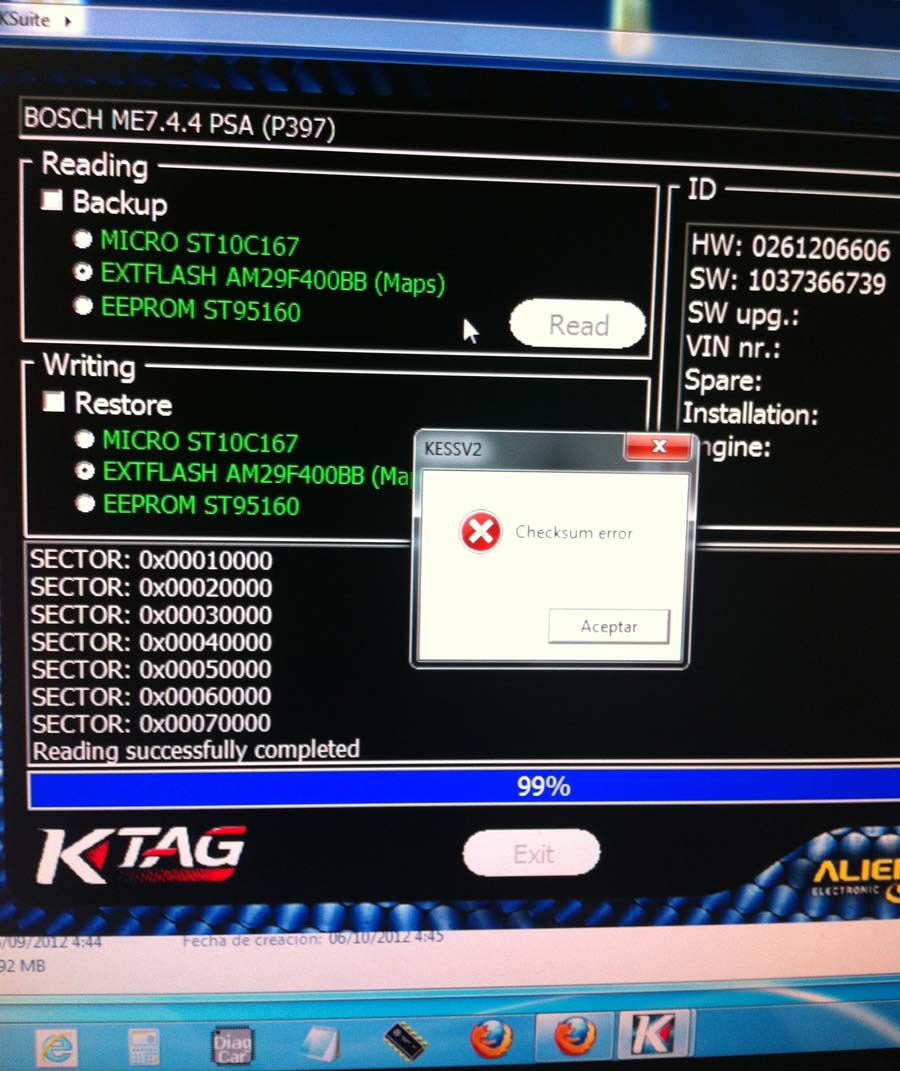
Q4: KTAG got error “checksum error”.

ktag-checksum-error-02
A4: there are three reasons cause checksum error:
1) the computer operation system is not compatible with KTAG, better use Windows XP or WIN7 professional;
2) there are some problem with KTAG software;
3) Ktag can’t work with these types of ECU at present. If needed, please ask us for remote assistance.

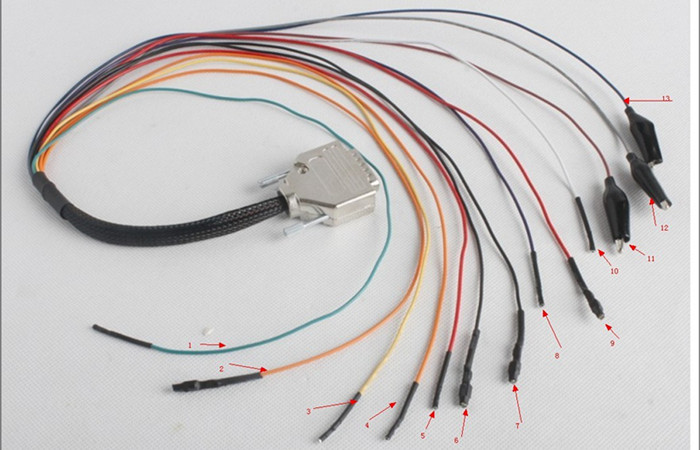
Q5: Do you have PDF instruction on this strip cable?

ktag-strip-cable
A5: Sorry, we only have KTAG driver installation video tutorial and BOOT cable instruction.
1)KTAG driver installation video tutorial: click column ” Video” at this page to watch or contact us to send you.
2)BOOT cable instruction as the following shows:

ktag-boot-cable-instruction

How to solve V2.11 KTAG K-TAG Master ECU Programming Tool Version 0?

How to solve V2.11 KTAG K-TAG Master ECU Programming Tool Version 0?

V2.11 KTAG K-TAG ECU Programming Tool Master with Hardware V6.070 is latest V2.11. It supports BDM function well and has no tokens limitation.  Available Protocols for K-TAG: BDM MOTOROLA MPC5xx.

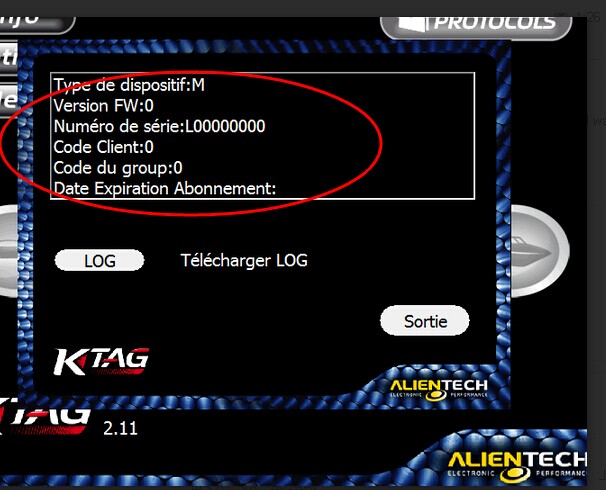
Customer Question: I used the KTAG K-TAG Master ECU Programming Tool for 3 weeks. But yesterday when I connected the ktag interface with my car, it prompted the Version FW:0. How can I do?

ktag-error

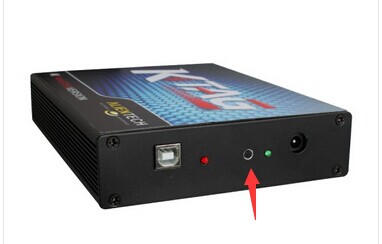
Answer: Please try to press the Ktag renew button. After pressing, connect the power supply cable. The light will turn to red. Then follow the unlock video in the software CD.

ktag-renew-button

Galletto 1260 ECU Chip Tuning Interface est le meilleur cadeau

Récemment, mon père essayait de trouver un moyen rentable de prolonger sa durée de vie Citroen. Sa voiture a été acheté il ya 8 ans, et ne fonctionne pas très bien maintenant. J’entends souvent les grincements quand je suis dans sa voiture. Il ya quelques jours, papa pensait à remplacer ses pièces d’automobiles, comme moteur, pour améliorer sa performance. Mais vous savez remplacement des moteurs est très coûteux.

Exactement son anniversaire approche; Je veux lui préparer un meilleur cadeau. Alors, j’ai décidé de demander à mes amis pour quelques conseils utiles. Il était seul à être le meilleur, après avoir réfléchi beaucoup. Pour lui acheter du matériel — Galletto 1260 pour ECU chip tuning.

Pourquoi je lui ai acheté un Galletto 1260? J’ai noté que cet outil de programmation est un matériel facile à puce auto tuning, qui prend en charge plus de voitures que tout autre OBD2 et le nouveau diesel TDi moderne, HDi, JTD et les voitures à essence. Encore un point qui attache beaucoup d’importance à la présente plusieurs langues, comme l’anglais, espagnol, allemand, italien, portugais et français, haut considération.
Mon père est conservateur français qui signifie qu’il ne peut pas parler anglais, même a de la difficulté à lire.

J’ai reçu hier Galletto 1260 et l’a utilisé pour programmer l’ECU Citroen. L’outil ne fonctionne! Il peut même travailler pour Citroen de non seulement mon père, mais aussi ma Skoda. C’est si surprenant. Le vendeur a dit que l’outil de programmation est capable de supporter plusieurs modèles de voitures, mais je doutait. Je ne m’attendais pas à un outil de 18 dollar de travailler avec plus d’une voiture. S’est avéré que j’avais tort, j’ai également reprogrammé la Passat de mon frère — a très bien fonctionné.

Utilisez €12.00 GALLETTO 1260 câble reflash Honda Civic écus

Disclaimer: Tout ce que vous faites sur votre voiture est fait à vos propres risques. Ce codage de l’ECU avec câble Galletto 1260 est assez simple à faire, mais il est aussi très simple à casser votre voiture si vous faites des erreurs ou par d’autres circonstances imprévues.

Vous pouvez obtenir le câble GALLETTO 1260 de EOBD2 pour €12.00 avec transport gratuit. Je vous recommande pas de câbles sur ebay ou d’autres magasins que je ne les ai pas essayé et ne peut garantir qu’ils vont travailler. Le logiciel Galletto 1260 doit être installé sur XP O / S.

GALLETTO 1260 de EOBD2 pour €12.00

Avis: Avant de commencer, désinstallez le logiciel anti-virus sur votre PC au cas où il endommage le logiciel. Avant de télécharger une nouvelle carte, assurez-vous de télécharger la carte existante et l’enregistrer dans le cas où la reconfiguration échoué.

Comment:

1. Copier les choses dans Galletto 1260 CD à travers le bureau.
2. Connectez GALLETTO 1260 câble au port CivicOBDII.
3. Assurez-vous que la lumière sur le connecteur du câble se allume.
4. Branchez le câble à votre PC et que vous suivez les instructions pour installer le pilote USB. Le périphérique approprié est FTDI FT8U2XX périphériques.
5. Tournez la clé sur se assurer qu’il est en 2ème position.
6. Démarrez le logiciel GALLETTO 1260 et sélectionnez Honda, edc16c31 puis Civic.
7. Cliquez sur écus Détecter et le logiciel va identifier votre ECU. Si la version est le même que le fichier disponible ici (1037390593), alors vous pouvez utiliser ce fichier pour télécharger après avoir enregistré l’original.
8. Téléchargez votre carte originale et sélectionnez “Lire écus” pour l’enregistrer. Couper le contact.
9. Mettre le contact sur la position 2. Cliquez sur le bouton “Ouvrir un fichier” et enregistrez-le d’écus en utilisant le bouton Télécharger le fichier. Cela effacera l’original puis de télécharger une mise à jour. Attendez quelques secondes pour un bip sonore, ce qui signifie l’ancienne carte est effacée et la nouvelle carte Vous verrez bientôt.
10. Terminé. Débranchez le câble.

Plus d’informations: http://www.eobdii.fr/wholesale/programmateur-calculateur-auto/